


Overview
In a Linux environment, awk is the most powerful tool for efficiently processing and filtering large text files or log data. Learn the core syntax and practical applications to handle column extraction, conditional filtering, and data aggregation in a single line of command without writing complex scripts.
1. Basic Working Principles of awk and Extracting Specific Columns
Create a sample text file where username, ID, and job role information are separated by whitespace for the awk command practice.

Use the awk command to extract and print the first field ($1), the username, and the third field ($3), the job role, from each line of the file using whitespace as a delimiter.
By default, awk splits fields based on contiguous whitespace or tabs unless a separate delimiter is specified.
⚙️ [Key Options]
-F fs : Specifies the input field separator (Field Separator).-v var=val : Assigns a variable and its initial value to be used inside the awk script before execution.-f progfile : Specifies the path to a file containing the awk script code to execute.

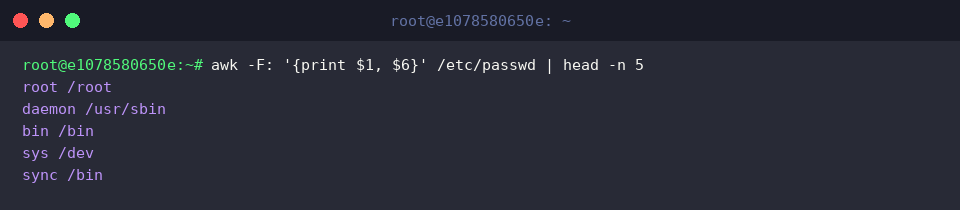
In the /etc/passwd file, which is separated by colons (:), specify the delimiter with the -F: option, then extract only the first field ($1) for the account name and the sixth field ($6) for the home directory path to inspect the top 5 lines.
2. Custom Data Filtering Using Conditionals and Operators
Create a server_resources.txt practice file containing CPU and memory usage data for each server.
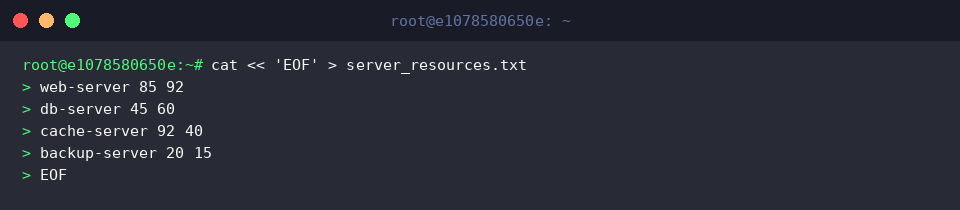
Filter targets where the second field ($2), CPU usage, is 80% or higher using a conditional expression, and print the corresponding server name along with a warning message.
This is useful when identifying system resources that have exceeded thresholds.

Use the logical AND operator (&&) to filter and print critical servers where both CPU ($2) and memory ($3) usage are 80% or higher.
Applying compound conditions allows you to isolate only targets where multiple resources exceed thresholds simultaneously.

3. Statistics and Aggregation Using Built-in Variables and BEGIN/END Blocks
Create a sample sales_data.txt file containing item names and sales amounts to practice data aggregation and statistics using awk.
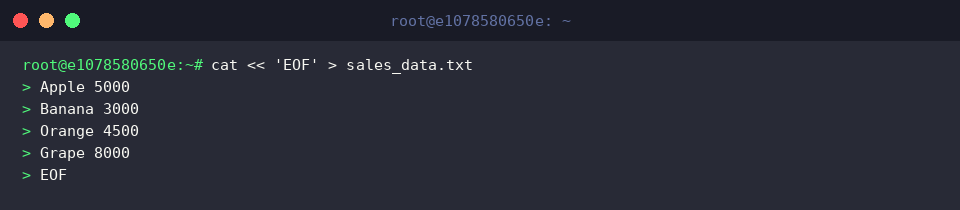
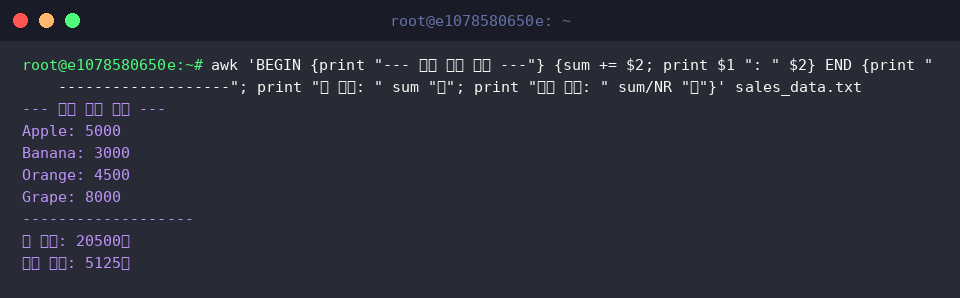
Use the BEGIN block to print a start message before processing the main body, and accumulate the value of the second field ($2) of each line into the variable sum.
In the END block executed after all lines of the file are processed, calculate and print the total sales and average sales using the built-in variable NR (total number of records).
4. Practical Web Server Log Analysis and Anomalous Traffic Filtering
Create an example access.log file in standard Nginx and Apache format to practice web server log analysis and error tracking.
![cat « ‘EOF’ > access.log
192.168.1.10 - - [10/Oct/2026:10:00:01] “GET /index.html” 200 4502
192.168.1.11 - - [10/Oct/2026:10:00:02] “POST /login” 401 1024
192.168.1.12 - - [10/Oct/2026:10:00:03] “GET /api/data” 500 2048
192.168.1.10 - - [10/Oct/2026:10:00:04] “GET /dashboard” 200 8920
192.168.1.13 - - [10/Oct/2026:10:00:05] “POST /login” 401 1024
EOF](/ubuntu/20261008_014637_7/captures/s04_c01_cat_____EOF____access_log_192_168_1_10_-_-__10_Oct.png)
Use the regular expression match operator (~) to filter 4xx client error and 5xx server error lines where the ninth field ($9), the HTTP status code, begins with 4 or 5.
From logs matching the condition, extract only the client IP ($1), request URI ($7), and status code ($9) to quickly identify incidents and abnormal traffic occurrences.
![awk ‘$9 ~ /^[45]/ {print $1, $7, $9}’ access.log](/ubuntu/20261008_014637_7/captures/s04_c02_awk___9______45____print__1___7___9___access_log.png)
Use awk’s associative array (ip[$1]++) to count the number of requests per connecting IP, print the total accumulated counts with a loop in the END block, and sort them in descending order of request frequency using the sort -rn pipeline.
This is a practical analysis technique for identifying excessive traffic or abnormal access attempts originating from specific IPs.
![awk ‘{ip[$1]++} END {for (i in ip) print ip[i], i}’ access.log | sort -rn](/ubuntu/20261008_014637_7/captures/s04_c03_awk___ip__1_____END__for__i_in_ip__print_ip_i___i.png)
We have explored the basic syntax and core practical examples of the awk command, which makes text processing and large-scale log analysis straightforward in a Linux environment.
Apply the various options and pattern techniques covered today directly to your practical workflows, and automate repetitive data extraction and processing tasks more efficiently.