


Overview
Delegating administrative access without exposing root credentials makes sudo an indispensable utility in modern Linux environments. This practical guide breaks down how privilege delegation works under the hood, highlights high-frequency CLI options used in production, resolves common shell redirection hurdles, and reviews configuration validation through visudo.
Inspecting User Credentials and Privilege Escalation Mechanics
To determine the active user identity within the current shell session, evaluate the primary User ID (UID) by invoking id -u.
The returned value 0 identifies direct access as the superuser account.

Prepend sudo to any routine utility to invoke it under administrative privileges rather than your unprivileged shell account.
Executing sudo id -u temporarily switches execution context to root, which yields UID 0.
⚙️ [Key Command Flags]
-l : Enumerates the authorized commands, privileges, and runtime default policies tied to the calling user.-i : Initializes an interactive login shell mimicking root, loading system profiles and root-specific environment variables.-s : Spawns an elevated shell while carrying over your current working environment.-u : Executes commands under a targeted alternative account instead of defaulting to root.-k : Invalidates cached session credentials immediately, forcing password verification on subsequent invocations.

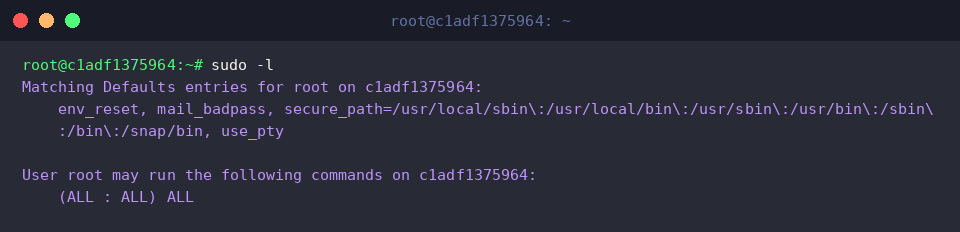
Querying privileges via sudo -l reveals which command definitions and Defaults directives govern the active session.
A privilege specifier showing (ALL : ALL) ALL confirms unconstrained superuser authority across every host service and binary.
High-Value Flags for Daily Administration: Target Users & Preserved Environments
Run sudo -i whoami to launch a command inside a full login shell initialized with root profiles.
Because the -i parameter switches the working directory to /root and applies standard initialization scripts, whoami returns root.

By default, security policies strip unvetted shell variables during escalation. The -E flag bypasses this sanitization by preserving existing exported parameters: sudo -E env | grep -E 'USER|HOME|SHELL'.
The resulting output confirms that original session definitions successfully pass through into the privileged runtime.

To demonstrate impersonating non-root service accounts, ensure a dummy target user exists with id -u nobody >/dev/null 2>&1 || sudo useradd nobody.

Leverage the -u option to drop superuser execution directly to an arbitrary user: sudo -u nobody whoami.
The output verifies that the spawned process executes strictly within the sandbox of the nobody security context.

Troubleshooting Shell Redirection and Permission Denied Errors
Set up an isolated workspace under /tmp to inspect permission boundary issues: mkdir -p /tmp/sudo_test.

Next, create an empty test target using elevated privileges via sudo touch /tmp/sudo_test/secure.txt.

Lock down file access exclusively to root read/write privileges with sudo chmod 600 /tmp/sudo_test/secure.txt.

Standard shell redirection (>) fails even when pre-pending sudo echo, because your unprivileged shell handles file descriptors before passing arguments. To safely append data across privileged boundaries, pipeline output into sudo tee -a /tmp/sudo_test/secure.txt.
The piped payload data echoes across standard output while writing cleanly into the protected file.

Confirm that the payload successfully landed inside the restricted file by reading it with elevated rights: sudo cat /tmp/sudo_test/secure.txt.
The verified payload string prints directly to the terminal.

Tear down temporary test artifacts to keep the host tidy: rm -rf /tmp/sudo_test.

Session Invalidation and Safe Policy Auditing with visudo
Executing sudo -v refreshes the authentication timestamp or confirms whether your cached ticket remains active without executing any payload.
When valid credentials exist, the timer resets silently with zero terminal noise.

When stepping away from a terminal, flush active cached credentials immediately with sudo -k.
This invalidates the timestamp cache so that any subsequent escalation prompts strictly for re-authentication.

Never modify sudoers configurations directly with conventional text editors; validate syntax integrity using sudo visudo -c.
The validator parses /etc/sudoers along with /etc/sudoers.d/*, returning parsed OK once rule structures are confirmed healthy.

Adopting these core flags, avoiding shell redirection traps, and validating configuration files will keep your day-to-day administrative tasks both secure and resilient across Linux deployments.