


Overview
Whether you are configuring production nodes, debugging native compilation failures, or assessing system requirements, determining your active kernel and underlying OS details is an essential first step. The standard uname utility provides an instant, zero-dependency breakdown of your system architecture and kernel runtime. This guide explores the most useful uname switches alongside real-world shell scripting techniques for automated environments.
1. Inspecting System Metrics at a Glance: Default Invocation and the -a Flag
Running uname without arguments queries the kernel implementation currently powering the operating system.
When executed standalone, the terminal yields a concise single-line descriptor—typically Linux across modern distributions.
⚙️ [Key Options Reference]
-a (--all) : Prints the full system profile in structured order, combining kernel name, network nodename, kernel release, build timestamp, and hardware architecture.-s (--kernel-name) : Reports the core kernel identifier (identical to the default output).-n (--nodename) : Displays the machine network hostname used across local network interfaces.-r (--kernel-release) : Outputs the version string of the currently active kernel release.-v (--kernel-version) : Exposes detailed build metadata, compilation timestamps, and internal patch revisions.-m (--machine) : Identifies the underlying hardware machine architecture (such as x86_64 or aarch64).-p (--processor) : Returns the processor architecture type, falling back to unknown if the platform leaves it unexposed.-i (--hardware-platform) : Identifies the hardware platform specification, showing unknown when unavailable.-o (--operating-system) : Displays the high-level operating system family (commonly GNU/Linux).

Invoking uname -a aggregates comprehensive hardware and kernel telemetry into a single line.
Evaluating this output reveals the local hostname (91d41b0fd0a6), the deployed kernel release (7.0.0-31-generic), compiler timestamps, the instruction set architecture (x86_64), and the platform identifier (GNU/Linux).

2. Pinpointing Kernel Releases and Compilation Timestamps: -s, -r, -v Options
The uname -s switch explicitly prints the operating system kernel name.
This matches the baseline behavior of uname without arguments; seeing Linux confirms that the active userspace interfaces directly with a standard Linux kernel runtime.

Running uname -r prints the active kernel release string.
The resulting value 7.0.0-31-generic breaks down major, minor, and patch levels alongside distribution ABI designations—critical data whenever building out-of-tree kernel modules, compiling DKMS packages, or installing hardware drivers.

Passing uname -v yields the exact build timestamp and compilation configuration for the loaded kernel image.
The diagnostic payload #31~24.04.1-Ubuntu SMP PREEMPT_DYNAMIC Mon Aug 10 09:38:02 UTC 2 details Ubuntu’s patch iteration, symmetric multiprocessing (SMP) enablement, dynamic preemption mode, and the exact build moment.

3. Verifying Network Hostnames and CPU Architecture: -n, -m, -p Options
Executing uname -n prints the network nodename assigned to the local instance.
The returned string 91d41b0fd0a6 provides instantaneous identity verification, helping administrators confirm they are working on the intended node within clustered, distributed, or containerized deployments.

The uname -m switch extracts the machine hardware instruction set.
Receiving x86_64 indicates a 64-bit x86/AMD64 platform. This inspection is mandatory prior to downloading prebuilt application binaries or verifying target cross-compilation compatibility.

In a similar vein, uname -p probes the processor architecture class.
While modern Linux hosts generally report x86_64, certain virtualization hypervisors or container runtimes may return unknown if CPU hardware tables are abstracted away.

4. Production Tips: Dynamic Bash Logic and Pairing with OS Release Metadata
The command KERNEL_ARCH=$(uname -m); echo "Current Architecture: $KERNEL_ARCH" captures machine architecture output directly into a shell variable and echoes it to standard output.
Automation scripts frequently rely on this pattern to dynamically branch installation routines, fetching the right package format (such as x86_64 versus arm64) on the fly.

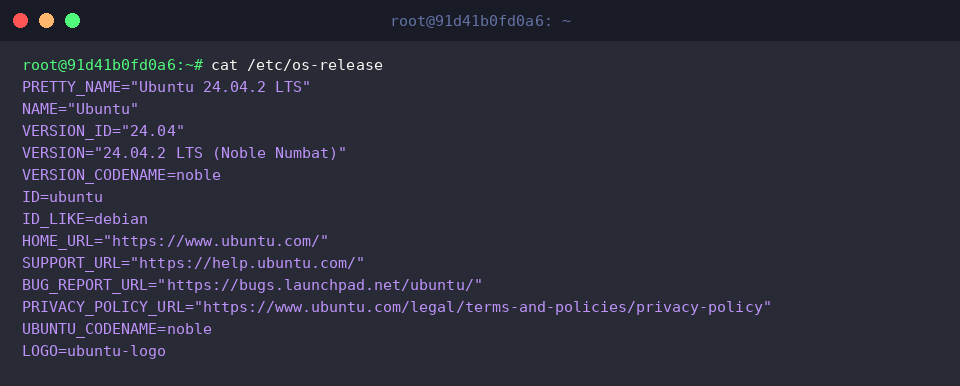
While uname provides comprehensive low-level kernel diagnostics, it does not detail userspace distribution releases. Running cat /etc/os-release exposes distribution metadata files to round out the picture:cat /etc/os-release displays distribution versioning and codename parameters, confirming the host operates on Ubuntu 24.04.2 LTS (Noble Numbat). Pairing uname with /etc/os-release gives you full visibility across both the kernel layer and userspace distribution.
Mastering the flags available in uname delivers an instantaneous, dependable method for validating Linux runtime environments without relying on third-party dependencies. Keep these options in mind whenever drafting provisioning scripts or diagnosing system configurations.