


Overview
Reliable storage mounting across Linux environments hinges on stable volume identifiers. Because legacy device names like /dev/sda can unpredictably shift between hardware reboots, systems engineers rely on Universally Unique Identifiers (UUIDs) to pin down targets. This tutorial breaks down the standard utility for the job—blkid—explaining how to extract partition identifiers, inspect filesystem signatures, filter block attributes, and safely feed those identifiers into your persistent /etc/fstab configuration.
Exploring Block Device Layouts and Global Attributes with blkid
Before querying underlying metadata, you can inspect the operational drive hierarchy using lsblk. This offers a bird’s-eye view of active partition boundaries, block capacities, and attached mount points across internal NVMe or SATA media.
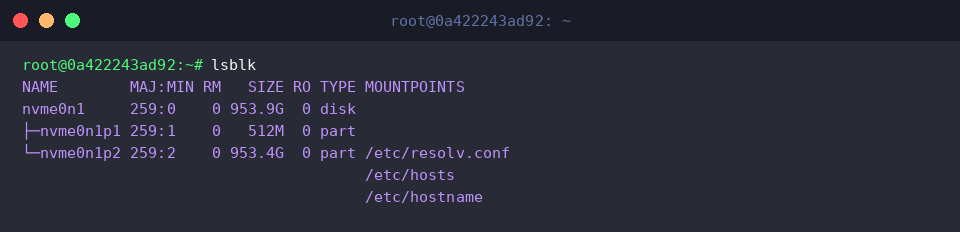
While tree viewers reveal physical structure, blkid drills directly into filesystem headers to extract operational metadata: volume UUIDs, filesystem formats (TYPE), partition labels, and hardware block parameters across all reachable storage nodes. Invoking the binary with root credentials (sudo) ensures unhindered access to low-level superblock headers across every attached volume.
⚙️ [Key Parameters]
-s <tag> : Restricts console output exclusively to the requested metadata tag (such as UUID, TYPE, or PARTUUID).-o <format> : Modifies presentation structure (value, list, device, export, full, etc.).-t <token> : Queries block storage for matching key-value criteria (e.g., TYPE=ext4).-L <label> : Resolves physical device nodes tied to an exact filesystem volume label.-U <uuid> : Traces the specific block device matching a designated UUID string.-p : Triggers low-level superblock probing while bypassing the kernel’s local cache (/etc/blkid.tab).-c <cachefile> : Overrides the default metadata cache file location or disables it entirely via /dev/null.

Targeting Specific Devices and Parsing Streamlined Outputs (-s, -o)
To streamline target selection across interactive workflows, you can resolve the root mount device on the fly with findmnt and store its path directly in the TARGET_DEV variable.

Passing an explicit device descriptor directly to blkid targets that individual node, avoiding a full host scan. It instantly reports attributes like UUID, BLOCK_SIZE, TYPE, and PARTUUID for the designated partition alone.

When authoring automation logic or unattended deployment scripts, raw token extraction is critical. Pairing the -s UUID filter with -o value strips away tag prefixes, field keys, and quotation marks, yielding a clean 36-character hexadecimal identifier ready to be consumed by downstream shell variables.

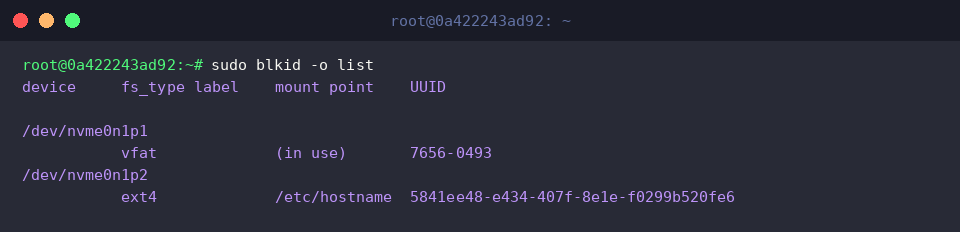
For human audits, switching to tabular formatting via -o list organizes attached storage into an aligned matrix. It lays out device paths, detected filesystem variants, current mount targets, and hardware UUIDs in a single clear overview.
Practical Walkthrough: Virtual Loop Disks and Volume Label Lookups
To experiment with volume tagging without touching production storage, allocate a temporary 30MB zero-filled disk image utilizing dd.

Transform the raw container file into an accessible system block interface by attaching it to an available loopback node through losetup, capturing the assigned endpoint inside LOOP_DEV.

Next, initialize the virtual media with an ext4 structure, applying an explicit human-readable filesystem label (MY_BACKUP) with the -L flag in mkfs.ext4.

Querying our newly populated loop interface verifies that the custom LABEL="MY_BACKUP" attribute, the newly initialized UUID, and the target ext4 filesystem signature are properly committed to the device superblock.

The utility also supports reverse lookups: passing -L MY_BACKUP prompts blkid to locate the corresponding storage device strictly by its label, resolving paths dynamically without prior knowledge of loop numbers or drive identifiers.

Once verification wraps up, release the active loopback attachment and remove the transient disk file to maintain a clean testbed.

Validating UUID Lookups (-U) and Constructing fstab Mount Rules
To assemble a reliable mounting definition, capture the root filesystem’s exact identifier directly into ROOT_UUID by piping findmnt resolution into blkid value parsing.

With this value exported, you can formulate standard entries for persistence inside /etc/fstab. Binding mounts to persistent volume UUIDs rather than transient node aliases guarantees reliable boot sequences, even when drive buses or PCIe enumeration orders shift unexpectedly.

Before editing production configuration tables, double-check your parsed identifiers using the reverse resolution switch -U. Supplying the UUID confirms the exact partition it maps to, safeguarding your systems against accidental misconfiguration or unbootable storage states.

Integrating blkid into your routine storage administration workflows eliminates guesswork from disk identification. Leveraging these metadata lookup flags and UUID-backed /etc/fstab directives builds a resilient, deterministic storage foundation for your Linux deployments.