


Overview
Harnessing the Bokeh command-line interface directly on Ubuntu provides developers with a streamlined pipeline for rendering data graphics without launching heavy GUI frameworks. This walkthrough covers the core CLI workflows—ranging from generating standalone client-side HTML files and serializing plot schemas into JSON to orchestrating reactive web dashboard sessions in production-like environments.
1. Setting Up Bokeh & Auditing System Config (bokeh info)
Kick off your workspace setup by refreshing the system repositories and provisioning the core Python runtime dependencies along with the Bokeh visualization package.
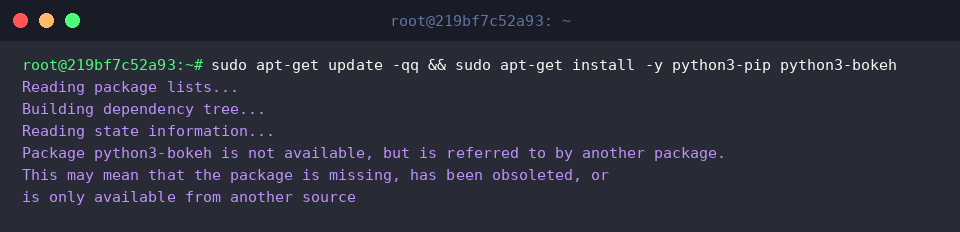
Executing bokeh info performs an immediate audit of your local runtime environment, reporting details such as package build versions, dependency trees, and backend rendering engines.
⚙️ [Primary CLI Commands & Flags]
info : Queries system state, library dependencies, diagnostic variables, and active paths.serve : Spins up an asynchronous Bokeh application daemon to handle real-time browser sessions.html : Builds completely self-sufficient HTML bundles containing inline client assets.json : Translates document models, glyph definitions, and underlying data into raw JSON payloads.secret : Generates cryptographically secure session signing keys for production server security.

2. Compiling Plots into Standalone HTML Documents (bokeh html)
Prepare an isolated project workspace by executing mkdir -p ~/bokeh-demo && cd ~/bokeh-demo to keep your demonstration assets organized.

Next, instantiate a minimal plotting script named plot_sample.py designed to render a basic navy scatter plot using circular markers.

Run bokeh html plot_sample.py to trigger the compilation process. This parses the Python visualization routine and bundles it into an independent, zero-dependency static web page ready for distribution across any standard browser.

To confirm the output artifact and verify its payload footprint on disk, run ls -lh plot_sample.html.

3. Serializing Plot Layouts and Datasets to JSON (bokeh json)
When integrating visualization logic with external frontends or microservices, bokeh json plot_sample.py > plot_output.json extracts the underlying model definitions and dataset schemas into a standardized JSON payload.
This decoupled representation enables headless downstream ingestion, such as consumption by the client-side BokehJS runtime or third-party web frameworks.

Inspect the generated payload by running head -n 20 plot_output.json to review the top twenty lines.
This step validates root model UUIDs, glyph renderer configurations, and serialized coordinate arrays to confirm correct layout construction.

4. Deploying Interactive Real-Time Dashboard Servers (bokeh serve)
Building dynamic, server-synchronized charts requires defining an application script. Create server_app.py, which binds a simple line graph directly to the active session document hierarchy via curdoc().add_root().
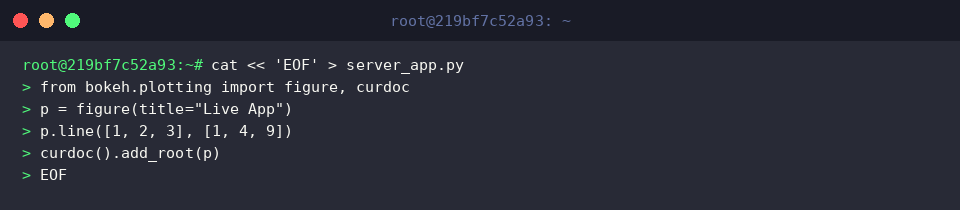
Launch the integrated application engine with timeout 5s bokeh serve server_app.py --port 5006 --allow-websocket-origin="*".
The --port 5006 parameter establishes the local listener interface, while --allow-websocket-origin="*" bypasses origin restrictions to permit bidirectional WebSocket communication across remote clients.

You now have a solid command-line foundation for manipulating Bokeh visualizations on Linux.
Leverage these utility switches to automate reporting jobs, export interoperable plot specifications, and ship responsive dashboards with minimal runtime friction.