


Overview
Bubblewrap (bwrap) is a lightweight sandboxing tool that allows unprivileged users to construct hardened containment boundaries across filesystems, networks, and process trees without requiring root privileges. In this walkthrough on Ubuntu 24.04, we explore how to install bubblewrap, configure fundamental isolation primitives, and inspect the core Linux namespace mechanics that power modern application isolation.
1. Installing Bubblewrap and Spawning a Minimal Isolated Shell
To assemble a secure, low-overhead sandbox environment, begin by installing the bubblewrap package from the official repositories.
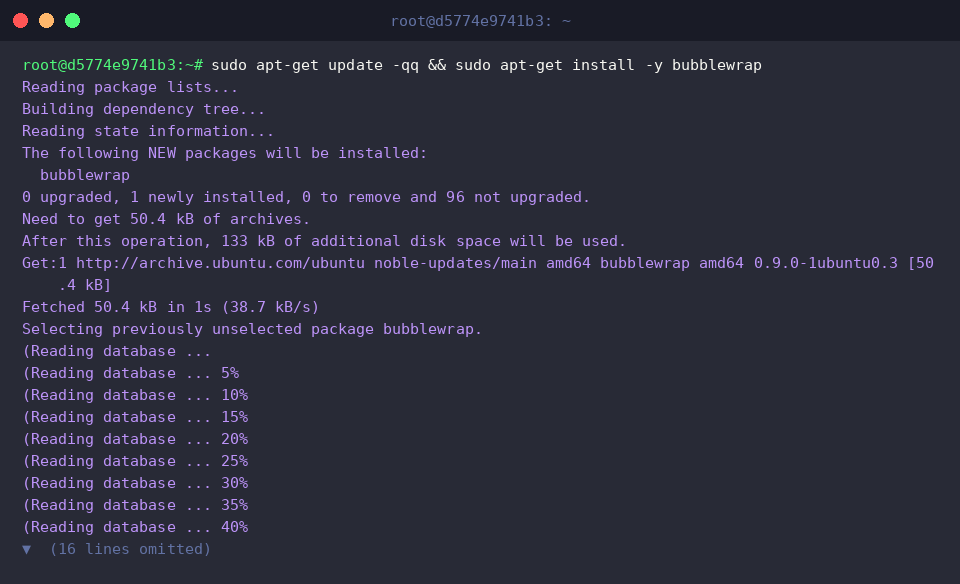
Under the hood, the bwrap utility leverages Linux unprivileged user namespaces to spin up a completely isolated sandbox and spawn child processes within it.
By mounting only selected host paths in read-only mode, administrators can initialize a strictly partitioned shell cut off from sensitive host assets.
⚙️ [Essential CLI Flags]
--ro-bind : Mounts a host directory or file inside the sandbox in read-only mode.--bind : Mounts a host directory or file with both read and write capabilities enabled.--dev : Provisions a private virtual device filesystem (/dev) inside the sandbox.--proc : Generates an isolated process information tree (/proc) for the child namespace.--tmpfs : Attaches an in-memory, transient filesystem scoped strictly to the sandbox lifecycle.--unshare-all : Fully detaches all namespaces—including User, IPC, PID, Network, UTS, and Cgroup—from the host.--symlink : Creates a symbolic link within the sandbox pointing to the designated target path.

2. Shielding the Filesystem with Read-Only Bind Mounts
To test read-only isolation, we first create a staging directory at /tmp/bwrap-test on the host and write a test string into a text file.

By pairing --ro-bind with bwrap, we map /tmp/bwrap-test from the host directly to /test inside the jail with read-only permissions and inspect the contents.
The stdout stream returns Original Content, verifying that read operations execute normally within the isolated jail.

Next, we evaluate write restriction by attempting to overwrite /test/data.txt inside the same sandbox instance.
Because --ro-bind denies write requests at the virtual filesystem layer, the modification attempt triggers an immediate error, leaving the host data unharmed and printing Write protected successfully.

3. Isolating Process Tables and Network Stacks
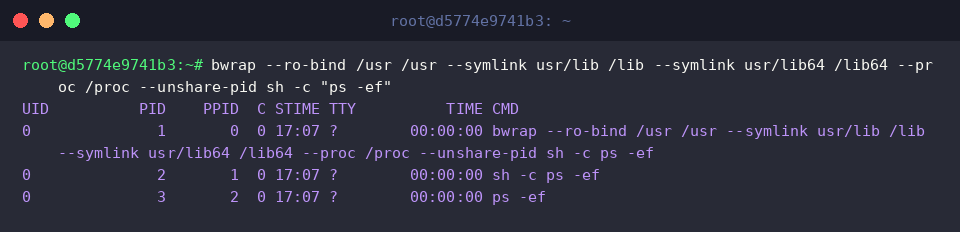
Combining --unshare-pid with --proc /proc provisions a private PID namespace that hides host workloads from the sandboxed environment.
Listing active processes inside the jail reveals that all host processes are obscured; only bwrap, sh, and ps are visible, assigned clean sequential PIDs beginning from PID 1.
Supplying the --unshare-net option completely decouples the sandbox from the host networking stack.
Because physical adapters and routing tables are not shared—and the loopback (lo) adapter is unconfigured by default—querying link states yields an empty list, severing inbound and outbound socket communications entirely.

4. Setting Up Volatile Workspaces Using tmpfs
Specifying --tmpfs /tmp mounts a RAM-backed, transient scratchpad at /tmp, allowing inside processes to generate temporary files like /tmp/sandbox.log.
The output confirms that processes can freely create, write, and read temporary data within this designated in-memory boundary.

Once the sandbox process terminates, we check whether /tmp/sandbox.log persists on the host.
Because files in --tmpfs exist solely in memory for the duration of the container process, all generated data vanishes upon exit, ensuring the underlying host filesystem stays completely clean.

Through Bubblewrap, administrators and developers can fine-tune access controls and partition system privileges with minimal overhead. By tailoring bind mounts, process visibility, and network boundaries, you can build reliable, custom-fit execution sandboxes for untrusted workloads.