


Overview
Operating systems administrators often need to optimize storage without compromising runtime convenience. Under Linux, bzexe fulfills this requirement by shrinking executable binaries with the bzip2 algorithm while preserving their ability to launch immediately from the shell without preliminary manual extraction. This walkthrough explores the utility’s core mechanics through a hands-on terminal session covering package provisioning, in-place binary compression, execution verification, decompression nuances, and final directory cleanup.
1. Installing Required Packages and Setting Up a Test Script
Begin by installing the bzip2 package—the parent suite providing bzexe—along with the file diagnostic tool to evaluate binary headers:
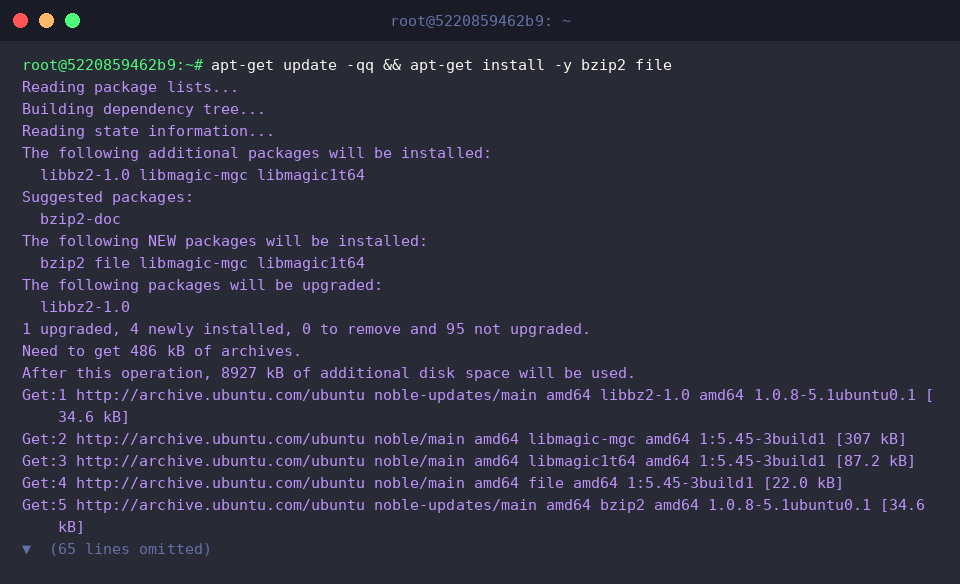
Create an isolated working directory for this exercise using mkdir -p ~/bzexe_demo:

To visibly observe compression gains, build a mock executable shell script named demo_app.sh that streams randomized base64 data:

Mark the newly created script as executable using chmod +x:

Confirm that the application logic functions properly by invoking demo_app.sh and sampling the first three output records:

2. Packaging the Executable with bzexe
Inspect the uncompressed footprint and filesystem attributes of demo_app.sh via ls -lh:

Execute bzexe ~/bzexe_demo/demo_app.sh to package the target into a self-extracting wrapper. Upon successful execution, the tool finishes silently and replaces the target file in place:

Verify the modified directory structure with ls -lh ~/bzexe_demo/. The utility automatically creates a backup copy suffixed with a tilde (demo_app.sh~) while writing a brand new, compressed wrapper under the original filename demo_app.sh:

3. Inspecting File Internals and Validating Direct Execution
Probe the newly generated demo_app.sh file with file ~/bzexe_demo/demo_app.sh to determine its updated internal structure. The diagnostic tool identifies it as a POSIX shell script executable containing embedded binary data, confirming that a self-extracting shell wrapper now encases the original payload:

Run file ~/bzexe_demo/demo_app.sh~ on the backup file to cross-reference its architecture against the original. As expected, the backup retains its original signature as a Bourne-Again shell script, ASCII text executable:

Execute ~/bzexe_demo/demo_app.sh | head -n 3 to verify that the compressed artifact launches transparently without manual unpacking. The decompression stub unpacks the payload on the fly at runtime, emitting the exact initial output as the original script:

4. Decompression Behavior and Environment Teardown
Attempt to decompress the packaged file back to its native state by calling bzexe -d ~/bzexe_demo/demo_app.sh. The utility may report that the target was left unchanged because the shell stub format is not recognized for reverse extraction:

Check the target’s metadata using ls -lh ~/bzexe_demo/demo_app.sh. The file size remains at 788 bytes, verifying that the contents were not modified:

Re-verify the file format using file ~/bzexe_demo/demo_app.sh. The output confirms that the artifact is still an active POSIX shell script executable wrapper:

Conclude the lab session by purging the temporary directory with rm -rf ~/bzexe_demo:

In summary, bzexe offers a reliable method for minimizing binary footprints on Ubuntu while ensuring immediate execution capability. While modern high-capacity storage environments often favor standard archive formats or filesystem-level compression, understanding self-extracting wrappers remains an essential skill when working with specialized or resource-constrained deployments.