


Overview
Whenever you invoke c++ directly in a Linux shell, what binary actually handles the compilation behind the scenes? This guide breaks down how the generic c++ wrapper operates within the operating system, unpacks its direct link to g++, and walks you through real-world compilation routines and standard configurations.
Provisioning the C++ Toolchain and Inspecting Compiler Versions
To prepare an Ubuntu workstation for C++ development, fetch the foundational GNU compiler collection and toolchain packages by running apt-get update -qq && apt-get install -y build-essential.

Query the exact binary location where the system resolves the c++ executable using which c++.

Execute c++ --version to inspect the release details, build target, and package version powering the active compiler.
⚙️ [Essential Compiler Flags]
-o <file> : Assigns a custom filename to the resulting output binary.-c : Compiles source translation units into unlinked object files (.o) while skipping the linker phase.-Wall : Turns on a comprehensive set of diagnostic warnings to flag questionable code patterns.-O2 : Instructs the optimizer to generate performant assembly without excessive binary bloat.-std=<standard> : Enforces a targeted ISO C++ language revision (e.g., c++17, c++20).-g : Embeds debugging symbols directly into the binary to enable source-level inspection in tools like GDB.

Demystifying /usr/bin/c++: Symlinks and the Relationship with g++
Run ls -l /usr/bin/c++ to examine the directory entry, permissions, and immediate symbolic link target for this standard command.
This step reveals that /usr/bin/c++ does not exist as an independent standalone compiler, but rather acts as an alias managed by the distro.

To track the entire redirection chain down to the actual underlying binary, execute update-alternatives --display c++ 2>/dev/null || readlink -f /usr/bin/c++.
This traverses Ubuntu’s alternatives system to expose the concrete GNU compiler executable (such as /usr/bin/g++) handling the workload.

Building and Running a Fundamental C++ Program with c++
Start by generating a concise test program, hello.cpp, equipped with basic standard output stream calls.
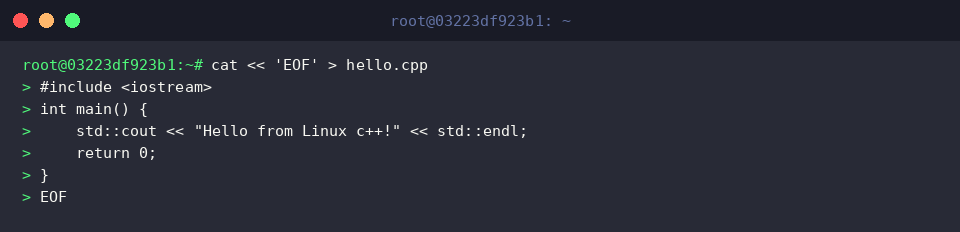
Invoke the c++ driver against hello.cpp, enabling intermediate optimizations and strict diagnostics while emitting a standalone executable named hello.
When the translation passes cleanly with zero warnings or syntax issues, the shell silently returns without extraneous logs.

Trigger the compiled binary directly from your current working directory.
Verify that the console prints the expected string "Hello from Linux c++!".

Compiling with Modern Standards: Enabling C++20 via -std=c++20
To verify compatibility with modern language features, construct a source file named modern.cpp that leverages compile-time constants and lightweight view semantics (std::string_view paired with constexpr).
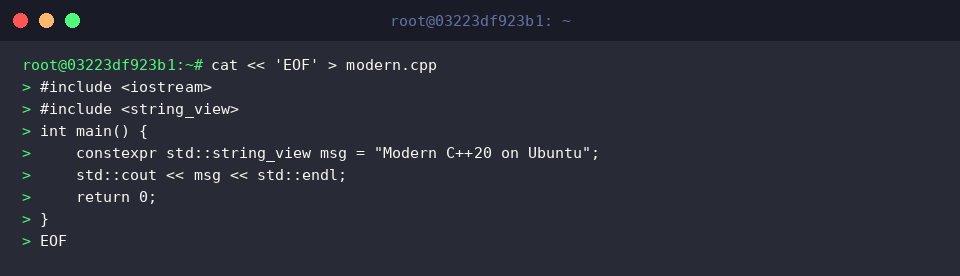
Pass the -std=c++20 argument to the c++ front-end to compile modern.cpp against the C++20 specification, writing the finished application out to modern.
A successful build terminates with no diagnostics, leaving the artifact ready for deployment.

Launch the new binary to confirm that modern language abstractions execute seamlessly on your distribution.
Ensure the terminal displays the configured banner, "Modern C++20 on Ubuntu".

You now have a clear operational understanding of how the c++ alias routes to g++ under Linux, alongside the foundational flags needed for reliable builds. Incorporate these compiler options into your daily terminal workflow to maintain fast, standards-compliant development environments.