


Introduction
This practical walkthrough demonstrates how to compile C programs under Ubuntu using c89, the POSIX-standard interface for ANSI C (C89/C90). We will walk through the entire build cycle from writing standard-compliant source code to generating standalone object files, resolving external library dependencies, and producing runnable binaries directly from the command line.
Installing the c89 Toolchain and Verifying the Setup
Before building legacy-compliant C software, ensure the system repository index is up to date and install both the GNU Compiler Collection (gcc) and the c89 wrapper utility.

Locate the binary on your executable search path with which c89 to verify a successful installation.

The c89 utility strictly enforces ANSI C (C89/ISO C90) syntax constraints during the compilation phase. On Debian and Ubuntu distributions, it acts primarily as an abstraction wrapper around gcc, enforcing appropriate conformance flags under the hood. Run c89 --version 2>/dev/null || gcc -v to inspect the underlying toolchain setup and backend compiler version.
⚙️ [Essential Command-Line Flags]
-c : Compiles source files into relocatable object code (.o) while suppressing the link stage.-o : Specifies the name and location of the generated executable file.-O : Activates performance optimizations to produce faster, leaner machine code.-s : Strips debugging symbols and symbol tables to minimize final binary size.-g : Emits native debugging symbols required by debuggers like GDB.-D : Defines preprocessor macro flags before source parsing begins.-U : Undefines previously declared preprocessor macros.-I : Appends custom directory paths for header file lookup.-L : Adds search directories for linking external library archives.-l : Directs the linker to resolve symbols against a specific library.

Writing Standard ANSI C Source and Building an Executable
To demonstrate standard single-step builds, write a minimal hello.c source file conforming strictly to C89 syntax:

Review the contents of hello.c with cat hello.c to confirm that the file was written without formatting errors:
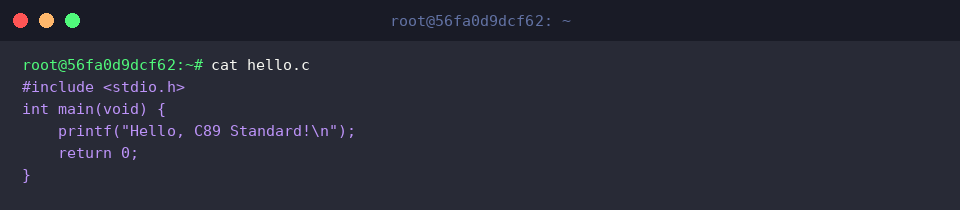
Invoke c89 to compile the source code, supplying -o to name the output binary hello:

Execute ./hello in your shell to verify that the program runs and prints its message as expected:

Separate Compilation: Producing Object Files (-c) and Linking
Modular projects often split source processing and linking into distinct stages. Begin by generating calc.c:

Pass the -c flag to c89 to instruct the compiler to stop before the link phase, producing an unlinked object file named calc.o:

Confirm the presence and file details of the newly created object file with ls -l calc.o:

Feed calc.o back into c89 with the -o switch to resolve runtime bindings and assemble the final executable calc:

Launch ./calc to check that the compiled binary executes properly:

Defining Preprocessor Macros (-D) and Linking libm (-lm)
To test compile-time macro injections and external library linking, write a program app.c that employs conditional compilation and floating-point math:

Compile the application by declaring the DEBUG macro with -DDEBUG and linking against the standard math library via -lm:

Run ./app to ensure both the conditionally compiled debug notice and the square root calculation output appear on the console:

This tutorial covered the fundamentals of compiling ANSI C code on Ubuntu using the standard c89 frontend. Mastering these techniques ensures strict adherence to historical C standards, enabling reproducible, deterministic builds across Unix-like production environments.