


Overview
Even with modern language revisions, mission-critical legacy codebases and resource-constrained embedded targets frequently demand strict conformance to the original ANSI C (C89) specification. This walkthrough explores practical C89 compilation techniques on Ubuntu using the c89-gcc frontend, covering fundamental build workflows, rigorous compliance diagnostics, and key syntactical caveats you are bound to encounter in production.
Toolchain Setup and Baseline Build Workflows
Before working with ANSI C, synchronize package repositories and install the base compiler collection via gcc:

Next, craft a minimal starter source file named hello_c89.c to test baseline compiler operation:
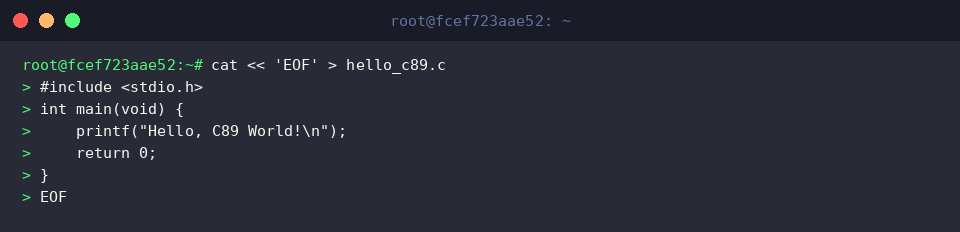
The c89-gcc wrapper provides a streamlined interface for compiling source code under strict C89 (ANSI C) language specifications.
⚙️ [Primary Compiler Options]
-o : Designates the destination file name for the compiled executable.-Wall : Enables a comprehensive baseline suite of diagnostic warnings.-pedantic : Enforces strict ANSI standard conformance by flagging non-standard extensions.-pedantic-errors : Promotes all pedantic compliance warnings into blocking compilation errors.-O2 : Applies standard performance optimizations without significantly degrading compilation speed.
Compile the source file into an executable binary:

Run the newly produced hello_c89 binary to verify that the toolchain emits functioning executables:

Enforcing Strict Conformance with -pedantic and -Wall
To examine how the compiler flags non-standard code constructs, assemble a clean compliance testing script named strict_test.c:
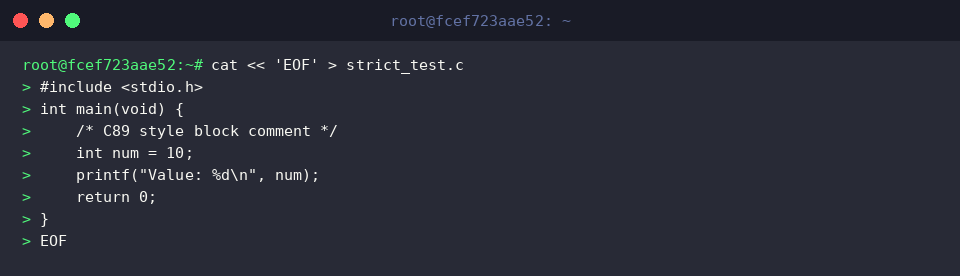
Pass -pedantic, -Wall, and -Wextra to activate exhaustive validation against language extensions and common structural bugs.
Because the source strictly adheres to C89 conventions, c89-gcc produces the target strict_test without diagnostic warnings:

Execute the compiled strict_test binary to ensure that verified code executes reliably:

Linking External Libraries and Enabling Optimization
Scientific calculations and advanced arithmetic frequently require shared system math libraries. Prepare math_demo.c to demonstrate external symbol resolution:
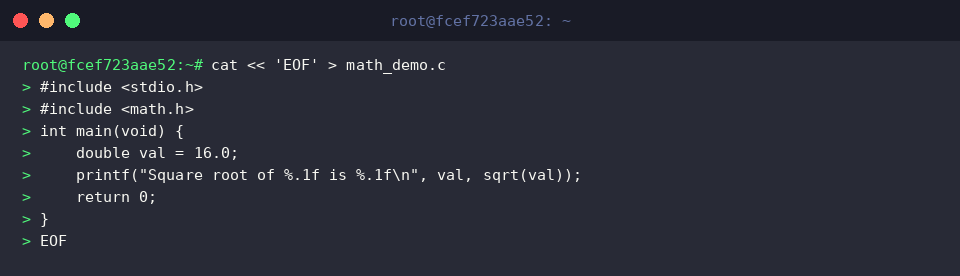
Instruct c89-gcc to apply -O2 optimizations while appending -lm to resolve symbols against libm.so.
The compiler generates optimized machine code and successfully resolves mathematical routines into the math_demo binary:

Launch the math_demo executable to verify that mathematical library calls return correct output:

Handling Strict C89 Scoping Rules and Practical Gotchas
Under standard C89 rules, variable declarations must appear at the very beginning of a compound statement block prior to any operational code. Create decl_rule.c to test standard-compliant scoping:
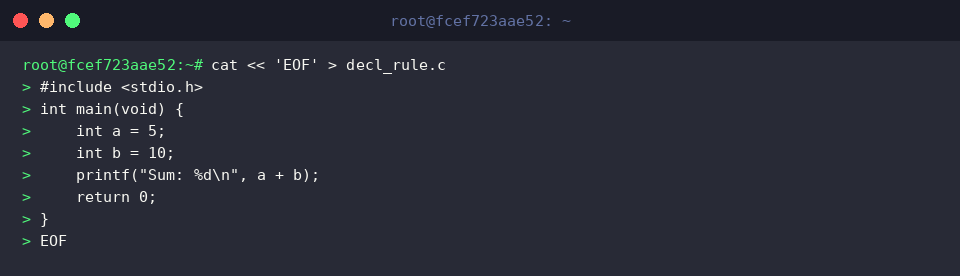
Enforce strict compliance by passing -pedantic-errors and compiling decl_rule.c into an intermediate object file decl_rule.o via -c.
Because every local variable is placed ahead of runtime statements, compilation completes cleanly without error:

Link the object file decl_rule.o into the final executable decl_rule:

Run the resulting decl_rule binary to verify expected program logic:

This tutorial highlighted fundamental compiler invocations, diagnostic flags, and syntax requirements when working with c89-gcc on Ubuntu.
Whether you are auditing legacy architectures or adhering to strict safety-critical portability standards, these flags and practices ensure predictable builds across standard-compliant environments.