


Overview
In SELinux-hardened Linux distributions, chcon (change context) serves as an essential command-line utility for modifying security context labels on files and directories on the fly. This walkthrough breaks down four practical operational workflows using chcon, highlighting critical considerations regarding label persistence across system reboots and relabeling events.
Inspecting Security Contexts and chcon Syntax Basics
To create an isolated sandbox environment for testing, set up a working directory and switch into it by running mkdir -p /tmp/chcon_lab && cd /tmp/chcon_lab.

Generate an empty document for label inspection and context manipulation tests by executing touch web_sample.html.

Inspect the security attributes currently assigned to the file by running ls -Z web_sample.html.
If the command output displays a ? symbol in place of a standard label tuple (user:role:type:level), SELinux is currently disabled or security context metadata is unassigned on the filesystem.
The standard command structure for overriding object labels follows the format chcon [options] context target-file.
⚙️ [Primary Command Options]
-t : Modifies the type identifier component of the security context.-u : Updates the SELinux user mapped to the target.-r : Reassigns the associated role attribute.-R : Recursively cascades label updates down entire directory hierarchies.--reference : Replicates the full security context from a designated template file.-v : Emits detailed diagnostic logs detailing each modification step.

Practical Pattern: Modifying the Security Type Flag (-t)
To simulate adjusting access controls for a web daemon, generate both the workspace directory and a mock document using mkdir -p /tmp/chcon_lab && touch /tmp/chcon_lab/index.html.

Grant web server processes read permissions by reassigning the file type to standard web content via chcon -t httpd_sys_content_t /tmp/chcon_lab/index.html.

Audit the updated label configuration on the file by running ls -Z /tmp/chcon_lab/index.html.
An output showing ? indicates that SELinux enforcement remains inactive on the host, meaning the updated context cannot be tracked dynamically.

Cloning Contexts with –reference and Batch Updating with -R
Prepare a nested directory structure containing a mock stylesheet by running mkdir -p /tmp/chcon_lab/public_html && touch /tmp/chcon_lab/public_html/style.css.

Create an unconfigured HTML document to act as the recipient for context replication by executing touch /tmp/chcon_lab/target_page.html.

Replicate the complete security context from index.html straight onto target_page.html by executing chcon --reference=/tmp/chcon_lab/index.html /tmp/chcon_lab/target_page.html.
Leveraging --reference eliminates the need to manually assemble complex label strings, safely borrowing tested parameters from functional files.

Apply the httpd_sys_content_t context type across the entire folder structure in one step using chcon -R -t httpd_sys_content_t /tmp/chcon_lab/public_html.
Supplying the -R argument ensures changes traverse subdirectories automatically, relabeling every child entry.

Verify the applied permissions and security settings across the directory tree by running ls -laZ /tmp/chcon_lab/public_html.
A ? placeholder indicates that SELinux remains inactive system-wide, preventing active context assignments from registering.

Crucial Caveats: Ephemeral Nature of chcon vs restorecon
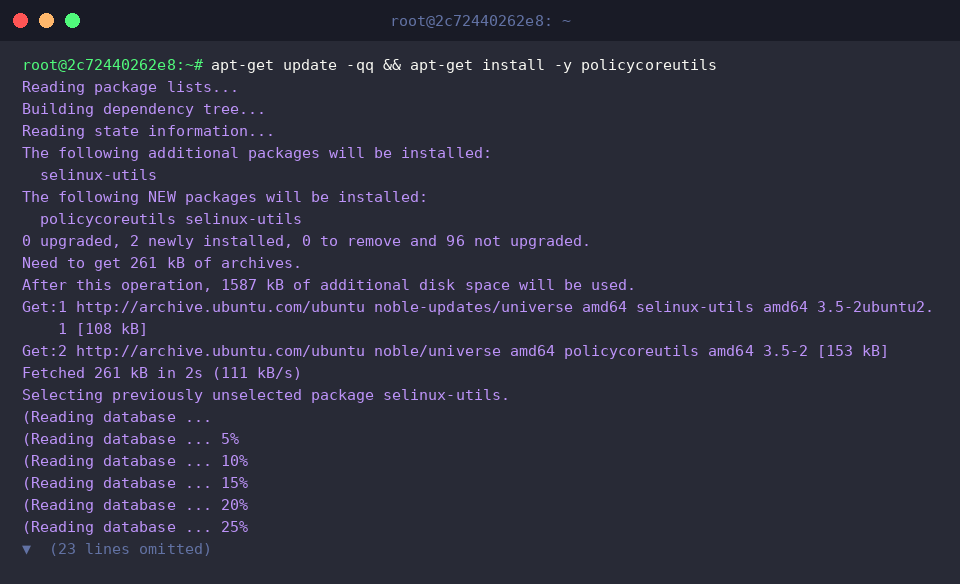
To access standard context repair utilities such as restorecon, install the required maintenance packages via apt-get update -qq && apt-get install -y policycoreutils.
Generate an isolated text document to evaluate context persistence behavior by executing touch /tmp/chcon_lab/warning_test.txt.

Temporarily reassign the file’s context type using chcon -t tmp_t /tmp/chcon_lab/warning_test.txt.
It is critical to note that changes made via chcon are strictly ephemeral and do not get registered in the system’s central policy store.

Confirm whether the custom context took effect by executing ls -Z /tmp/chcon_lab/warning_test.txt.
A displayed ? character reflects that the operating environment currently lacks active SELinux policy enforcement.

Attempt a label reset back to default system policy specifications by executing restorecon -v /tmp/chcon_lab/warning_test.txt.
Because chcon modifications bypass the persistent database, running restorecon or triggering a global filesystem relabel (autorelabel) will wipe out custom tweaks in favor of default policies; persistent definitions require configuring rules through semanage fcontext.

Review the post-restoration file status by invoking ls -Z /tmp/chcon_lab/warning_test.txt.
The output retains the ? token, confirming an inactive SELinux state on the running host.

Understanding how chcon operates allows system administrators to troubleshoot permissions and test configurations quickly. However, recognizing the temporary nature of these overrides ensures that production services maintain durable, secure, and reboot-resilient access policies.