


Overview
When auditing system configurations or reconciling data sets in Linux, pinpointing overlaps and discrepancies between text streams is a daily necessity. The native comm utility offers a lightweight, high-performance way to evaluate two files line by line. This guide walks through practical applications of comm, covering its core three-column structure, numerical filtering flags for mathematical set operations (intersections and complements), and real-time process substitution for handling unsorted streams.
1. Anatomy of comm: Demystifying the Three-Column Output
Set up an isolated lab directory for this exercise using mkdir -p ~/comm_lab && cd ~/comm_lab.

Construct the first alphabetically sorted dataset, fruits_a.txt, by executing printf "apple\nbanana\ncherry\nmango\n" > fruits_a.txt.

Next, build the complementary sorted dataset fruits_b.txt with overlapping and unique records via printf "banana\ncherry\norange\nwatermelon\n" > fruits_b.txt.

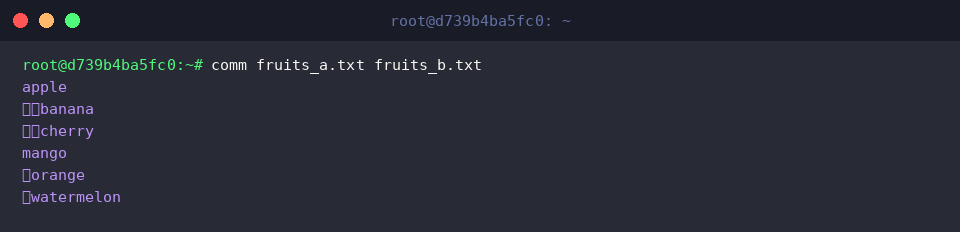
By default, comm performs a line-by-line comparison across two lexicographically ordered files and displays results across three tab-separated columns:
- Column 1 (zero indent): Records exclusive to the first file.
- Column 2 (indented by one tab): Records exclusive to the second file.
- Column 3 (indented by two tabs): Shared records appearing in both files.
⚙️ [Key Options]
-1 : Suppress lines unique to the first file (Column 1).-2 : Suppress lines unique to the second file (Column 2).-3 : Suppress shared lines present in both files (Column 3).--check-order : Enforce strict sorting checks; abort execution if files are out of sequence.--nocheck-order : Bypass input sorting verification entirely.--output-delimiter=STR : Replace the standard tab delimiter with a custom string (STR).
2. Extracting Intersections and Set Differences Using Numerical Flags
Confirm your shell session is inside the practice workspace by running cd ~/comm_lab.

Executing comm -12 suppresses both Columns 1 and 2, isolating lines common to both files—the mathematical intersection.
As expected, only the overlapping entries banana and cherry are printed to the terminal.

To isolate lines exclusive to the initial dataset (the relative difference $A \setminus B$), use comm -23 to omit Columns 2 and 3.
This operation returns only apple and mango, representing records found exclusively in fruits_a.txt.

Conversely, running comm -13 suppresses Columns 1 and 3 to isolate entries belonging solely to the second input ($B \setminus A$).
The terminal displays orange and watermelon, which exist only inside fruits_b.txt.

3. Comparing Unsorted Data Streams via Bash Process Substitution
Return to the practice directory with cd ~/comm_lab.

Real-world datasets and logs often lack pre-sorted formatting. Prepare an unsorted file unsorted_a.txt by running printf "zebra\napple\ngrape\n" > unsorted_a.txt.

Generate the second unsorted target file unsorted_b.txt using printf "apple\norange\nzebra\n" > unsorted_b.txt.

Because comm relies on sorted input streams, piping unsorted files directly results in ordering errors. By leveraging Bash process substitution (<(...)), you can pass sorted streams on the fly via comm <(sort unsorted_a.txt) <(sort unsorted_b.txt) without creating intermediate scratch files on disk.
The comparison succeeds seamlessly: Column 1 shows grape, Column 2 displays orange, and Column 3 highlights common entries apple and zebra.

Pairing process substitution with column suppression, comm -12 <(sort unsorted_a.txt) <(sort unsorted_b.txt) directly yields the intersection while ignoring individual differences.
Even with raw, disordered inputs, this one-liner cleanly captures the shared items apple and zebra.

4. Production Use Cases: Package Audits and Case-Insensitive Matching
Ensure you are in the lab directory before testing administrative workflows by running cd ~/comm_lab.

A frequent system administration task involves reconciling software environments across servers. Simulate a package manifest for Server 1 with printf "curl\ngit\nnginx\nvim\n" > server1_pkgs.txt.

Assemble a differing package inventory for Server 2 using printf "docker\ngit\npython3\nvim\n" > server2_pkgs.txt.

Running comm -3 server1_pkgs.txt server2_pkgs.txt suppresses shared packages (Column 3) to illuminate configuration drift between the nodes.
Identical installations like git and vim are hidden, exposing only the divergences: Server 1 exclusively runs curl and nginx, whereas Server 2 maintains docker and python3.

Handling casing differences requires special care. Create a sample with varied capitalization via printf "Apple\nBANANA\ncherry\n" > mixed_a.txt.

Create the comparison file with inverted casing using printf "apple\nbanana\nCHERRY\n" > mixed_b.txt.

The command comm -12 --nocheck-order <(sort -f mixed_a.txt) <(sort -f mixed_b.txt) sorts both inputs case-insensitively using sort -f and suppresses order mismatch warnings via --nocheck-order.
However, because comm evaluates equality strictly at the byte level, sorting lines without case sensitivity does not convert them into identical matches; differing cases like Apple and apple fail to match, producing empty output.

The Linux comm utility remains an indispensable tool for rapidly comparing datasets, verifying configurations, and filtering structured lists. Combining its column control flags with shell pipelines and sorting routines provides a powerful alternative to heavier parsing utilities in everyday automation workflows.