


Overview
Peering beneath user space to observe how software dialogues with the Linux kernel represents the cornerstone of systems diagnostics. By installing and operating strace, administrators and engineers can intercept runtime system calls directly, turning opaque process crashes and mysterious hangs into transparent, actionable debugging insights.
Installing strace and Inspecting Basic System Calls
Begin by refreshing the repository metadata and installing the strace diagnostic binary onto the Ubuntu host.
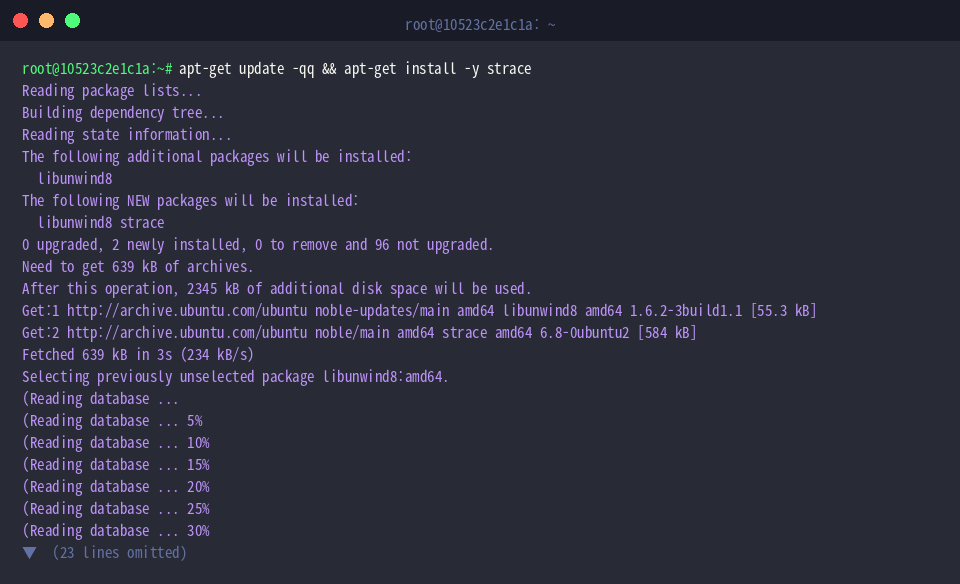
To establish a clear target for I/O inspection, write a dummy string into a temporary scratch file using echo 'Linux strace test content' > /tmp/testfile.txt.

At its heart, strace functions by tapping into the ptrace subsystem, monitoring every system call invoked and signal received while a program runs.
Wrapping standard utilities like cat inside strace reveals the entire lifecycle of file access right on your terminal: acquiring the descriptor (openat), pulling bytes into memory (read), flushing output to stdout (write), and relinquishing the handle (close).
⚙️ [Essential CLI Flags]
-c : Compiles an aggregate summary detailing total execution time, call frequencies, and encountered failures per syscall.-e : Applies expressions to isolate specific system events or filter targeted syscalls.-o : Redirects raw tracing streams into a specified destination file rather than stdout/stderr.-p : Attaches non-destructively to an already active process by referencing its unique PID.-T : Appends the exact elapsed wall-clock duration spent inside each kernel routine.-tt : Prefixes log entries with high-precision timestamps resolved down to microseconds.-s : Adjusts the maximum byte threshold displayed for string arguments and payloads.

Filtering Specific Syscalls with the -e Flag
Running strace -e trace=openat,read,write,close cat /tmp/testfile.txt cuts through the overwhelming initialization chatter, exposing solely the quartet of essential file I/O calls: openat, read, write, and close.
Supplying comma-separated routines directly to -e trace= eliminates runtime noise and lets engineers scrutinize data transfer bottlenecks instantly.

Executing strace -e trace=file ls -l /tmp/testfile.txt leverages the built-in file class shortcut to catch all path-related operations simultaneously.
Rather than enumerating dozens of low-level calls manually, this preconfigured group tracks path lookups, permission evaluations, and inode metadata lookups in a single sweep.

Profiling Bottlenecks and Execution Stats with -c
The command strace -c ls -la /usr/bin > /dev/null aggregates complete performance statistics while traversing the heavily populated /usr/bin hierarchy.
Dumping standard utility output into /dev/null keeps your screen clear, leaving a crisp analytical table that highlights execution time percentages, cumulative seconds, call frequencies, and error tallies across every syscall invoked.

Issuing strace -c grep -rn 'root' /etc/passwd > /dev/null gathers resource metrics while searching across system configuration files.
Supplying discarded output streams enables immediate identification of heavy consumers—revealing whether filesystem descriptor allocation or buffer parsing absorbs the lion’s share of CPU time during repetitive search sweeps.

Attaching to Live Processes and Logging Output (-p, -o)
To practice dynamic debugging on detached background workloads, launch a lightweight stand-in process using sleep 100 &.

Capture the unique process identifier of this newly launched background job by assigning $! to an environment variable via TARGET_PID=$!.

Executing strace -p $TARGET_PID -o /tmp/strace_output.log -t & hooks into the live target daemon, recording every kernel interaction along with second-resolution timestamps straight to disk.
Because monitoring runs asynchronously without occupying the foreground shell, production workloads and system daemons can be audited non-intrusively for post-mortem investigations.

Allow the instrumentation hook sufficient headroom to initialize and lock onto the target by executing sleep 1.

With the tracking session established, terminate the background test runner cleanly by issuing kill $TARGET_PID.

Inspect the initial captured entries within the persisted output file using head -n 20 /tmp/strace_output.log.
The resulting log entries clearly illustrate the trapped SIGTERM signal, documenting the exact chain of teardown calls that transitioned the process toward its final exit status.

You now command the foundational capabilities of strace—the ultimate weapon for diagnosing stubborn Linux anomalies.
Whenever an application crashes without meaningful stack traces or stalls unpredictably, hooking into system calls demystifies kernel interactions and accelerates your path to resolution.