


Technical Overview
GNU coreutils forms the structural bedrock of modern Unix and Linux system administration. Moving beyond superficial flag memorization, this guide explores the low-level operating system mechanisms behind standard commands. Through hands-on terminal workflows, we dissect filesystem index nodes (inodes), standard stream buffering, link table references, and kernel page cache synchronization during block-level I/O operations.
Investigating Metadata and Index Nodes: ls vs. stat
To isolate our test environment and avoid collision with existing user files, we begin by setting up a dedicated sandbox directory via mkdir -p /tmp/coreutils_demo/files && cd /tmp/coreutils_demo/files.

Next, populate a minimal ASCII text file to serve as our target for attribute inspection by executing echo 'GNU Coreutils Deep Dive' > sample.txt.

While ls is traditionally recognized as a directory listing utility, combining it with diagnostic flags reveals fundamental POSIX filesystem attributes. Running the command with -lai exposes both human-readable attributes and the operating system’s internal index number. The leading integer 15 represents the file’s unique inode—the filesystem data structure storing ownership, permission bits, and data block pointers.
⚙️ [Key Options]
-a : Disables exclusion filters to include hidden entries beginning with a period (.).-l : Formats output into a detailed columnar view detailing permissions, link count, ownership, and byte size.-i : Prints the internal filesystem index number (inode) assigned to each directory entry.-h : Converts raw byte calculations into human-friendly binary prefixes (KiB, MiB, GiB).-t : Orders the directory hierarchy chronologically by last modification timestamp.-S : Reorders listed entries descending by total file allocation size.

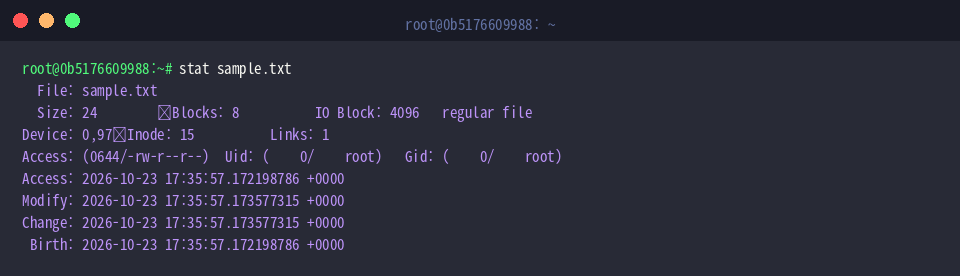
When deeper diagnostic detail is required, stat bypasses basic directory parsing to make direct kernel system calls against the file. The resulting output exposes exact block allocations, hard link counts, IO transfer block sizing, and the complete quartet of POSIX timestamps: Access, Modify, Change (status alteration), and Birth (creation time).
⚙️ [Key Options]
-c : Evaluates custom format specifiers to extract isolated metadata fields into automated pipelines.-f : Inspects the mounting filesystem superblock rather than individual file objects.-t : Flattens the structured diagnostic dump into a single space-delimited string for scripting.-L : Instructs the kernel to dereference symbolic links and report the attributes of the target file.
Stream Processing and Sequential Pipelines: head, tail, and wc
Switching from metadata inspection to data stream processing, return to the demo workspace directory using cd /tmp/coreutils_demo/files.

We construct an integer sequence from 1 to 100 via seq 1 100 > numbers.txt to create an ordered stream suitable for range evaluation.

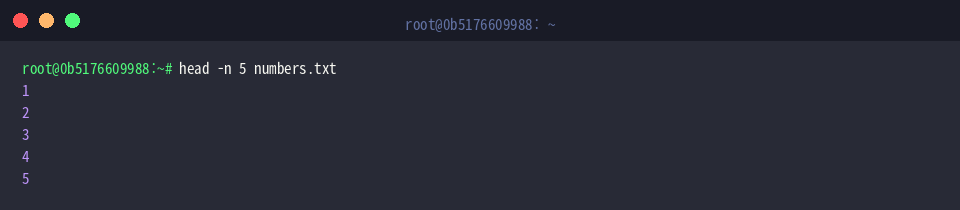
The head utility intercepts the beginning of an incoming stream or file descriptor. Invoking head -n 5 numbers.txt restricts standard output to the first five line breaks encountered in the file.
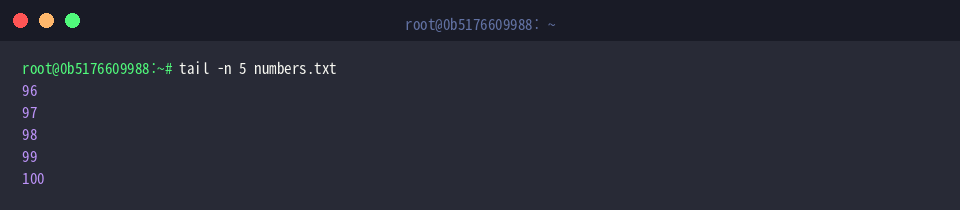
Conversely, tail evaluates data from the end of the file descriptor backwards. Specifying -n 5 reads the trailing boundary of the stream, rendering lines 96 through 100.
To analyze stream volume without opening a visual pager, wc parses newline, whitespace, and raw byte boundaries. Supplying -l -w -c against numbers.txt returns line count (100), lexical word tokens (100), and total byte allocations (292 bytes).

Filesystem Link Architectures: Hard Links vs. Symlinks
Navigate back to the project root with cd /tmp/coreutils_demo to evaluate link structures across directories.

The ln utility generates direct directory entry references pointing to an underlying inode. Creating a hard link with ln files/sample.txt hardlink.txt associates a secondary filename entry with the exact same physical inode on disk.

Introducing the -s parameter via ln -s files/sample.txt symlink.txt alters the link mechanism entirely, generating a symbolic (soft) link. Unlike hard links, a symlink creates a new file entity containing nothing more than the relative or absolute target string path.

A comparative query using ls -li files/sample.txt hardlink.txt symlink.txt illustrates the structural contrast. Both files/sample.txt and hardlink.txt share inode 15 and reflect an incremented link counter of 2. In contrast, symlink.txt maintains an independent inode (17) and points to its target through path resolution.

Low-Level Block I/O and Dirty Page Flushing: dd and sync
We now turn to block-level storage allocation in cd /tmp/coreutils_demo.

The dd utility operates directly at the byte and block interface. Reading null bytes from /dev/zero through if=/dev/zero of=test_10mb.bin bs=1M count=10 status=progress, the command writes ten sequential 1MB blocks to generate an exact 10MB test image while reporting instantaneous throughput metrics.

Because Linux employs aggressive write-back caching, written data often resides in volatile RAM as kernel “dirty pages” prior to physical persistence. Invoking sync test_10mb.bin forces the kernel to flush pending buffers directly to persistent non-volatile storage.

Finally, verify the resulting image size using ls -lh test_10mb.bin. The formatted metadata confirms that a verified 10MB file allocation has been written and persisted to the underlying storage volume.

Understanding the internal mechanics of coreutils bridges the gap between everyday shell commands and fundamental Linux operating system engineering. Grasping how inodes, stream pipelines, and kernel buffers interact unlocks faster debugging and more reliable production workflows.