


Overview
Understanding how the C preprocessor transforms source files prior to compilation is critical for debugging intricate builds and resolving elusive macro-expansion bugs. This hands-on walkthrough examines GNU cpp on Ubuntu, demonstrating how to isolate preprocessor behavior, trace complex macro substitutions, evaluate conditional blocks, and configure header lookup paths directly from the terminal.
Verifying Installation and Environment Setup
To ensure the C preprocessor is available in the current environment, install the GNU Compiler Collection suite using apt-get update -qq && apt-get install -y gcc.
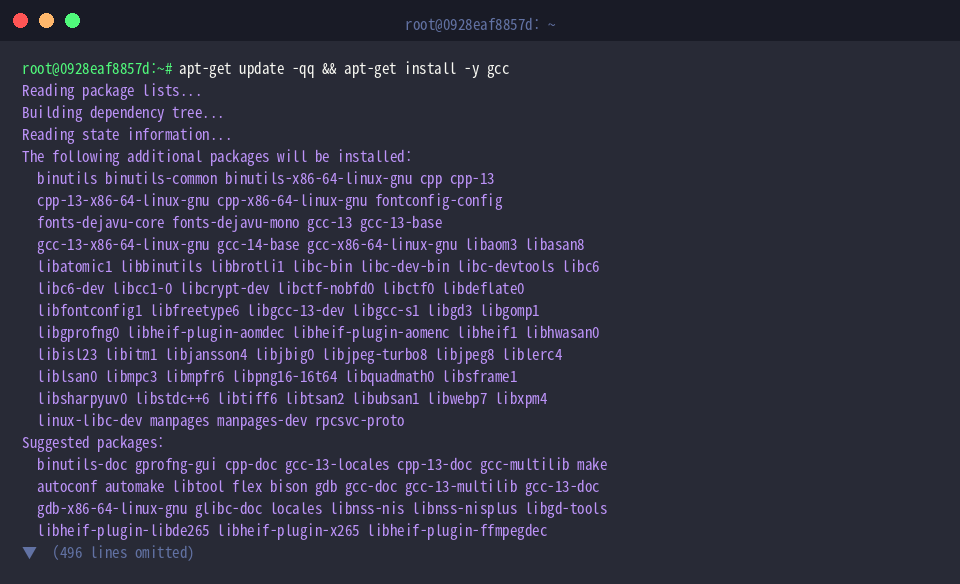
Next, locate the preprocessor binary on the search path by invoking which cpp.
The resolved path /usr/bin/cpp indicates that the default system toolchain is correctly mapped and accessible system-wide.

Inspect the installed version string and GNU release metadata by executing cpp --version.
In this Ubuntu installation, GCC version 13.3.0 is configured, providing full support for modern preprocessor features.
⚙️ [Essential Command-Line Flags]
-D name : Injects a predefined macro directly into the translation unit, driving preprocessor logic and constant values.-U name : Strips or undefines a previously declared macro or built-in definition.-I dir : Appends an explicit directory to the search hierarchy for resolving #include directives.-dM : Generates a comprehensive dump of all active macro definitions present at the end of preprocessing.-dD : Emits #define directives inline alongside the transformed output code.-P : Suppresses the generation of linemarkers (#line directives) to produce clean, readable source text.-v : Activates verbose diagnostics, revealing the internal header search order and runtime stages.

Inspecting Basic Macro Substitution and Expansion
Create an isolated directory for experimentation and switch into it by running mkdir -p ~/cpp_practice && cd ~/cpp_practice.

Generate a small C snippet showcasing both object-like and function-like macros via printf '#define BUFFER_SIZE 1024\n#define SQUARE(x) ((x) * (x))\nint limit = BUFFER_SIZE;\nint area = SQUARE(5);\n' > macro_test.c.

Run the preprocessor standalone against the source file and write the expanded translation unit into an intermediate file with cpp macro_test.c output.i.
This pass parses all macro identifiers, replaces them with their token sequences, and emits the resulting translation unit into output.i.

Filter out preprocessor linemarkers and examine the raw output text using cat output.i | grep -v '^#'.
As shown in the output, BUFFER_SIZE has resolved directly to integer constant 1024, while SQUARE(5) has expanded into the expression ((5) * (5)).

Testing Conditional Compilation with External Macro Flags (-D, -U)
Ensure your shell session remains in the dedicated directory using cd ~/cpp_practice.

Construct a test file containing branch directives to verify how preprocessor conditionals behave under external flags: printf '#ifdef DEBUG\nconst char *status = "DEBUG_ENABLED";\n#else\nconst char *status = "PRODUCTION";\n#endif\n' > condition_test.c.

Inject a symbol from the command invocation while stripping debug linemarkers with cpp -DDEBUG -P condition_test.c.
Passing -DDEBUG satisfies the #ifdef branch, instructing the preprocessor to emit const char *status = "DEBUG_ENABLED"; while discarding the fallback branch entirely.

Conversely, enforce macro cancellation during invocation by executing cpp -UDEBUG -P condition_test.c.
Because -U explicitly clears DEBUG, execution diverts to the #else block, yielding const char *status = "PRODUCTION"; in the generated output.

Customizing Header Search Paths and Sanitizing Output (-I, -P)
Return to the practice directory with cd ~/cpp_practice.

Establish an external directory to isolate non-standard project headers using mkdir -p custom_headers.

Populate a header declaring an application release identifier with echo '#define APP_VERSION "1.0.0"' > custom_headers/version.h.

Draft a main source file that consumes this separate header: printf '#include "version.h"\nconst char *ver = APP_VERSION;\n' > main_app.c.

Supply the include directory to the preprocessor while suppressing line noise via cpp -I./custom_headers -P main_app.c.
The -I flag tells the preprocessor where to search for "version.h" outside the immediate directory tree, and -P removes linemarkers to render a concise translation containing solely const char *ver = "1.0.0";.

Running cpp independently gives engineers clear visibility into the macro substitution phase before full compilation kicks in. Mastering these flags simplifies tracking down subtle macro discrepancies, diagnosing missing include dependencies, and validating build configurations across Linux toolchains.